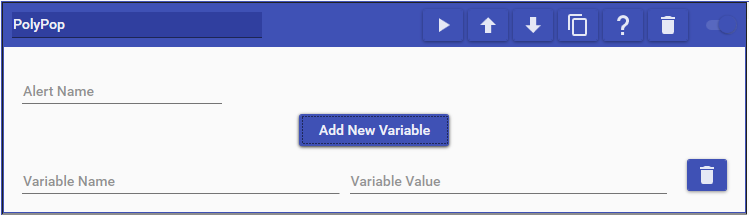
PolyPop actions allow you to trigger alerts for sources in your scenes. Simply specify the name of the alert you made and then add a variable for every piece of data you would like to send over for the alert.
Configuring Alerts
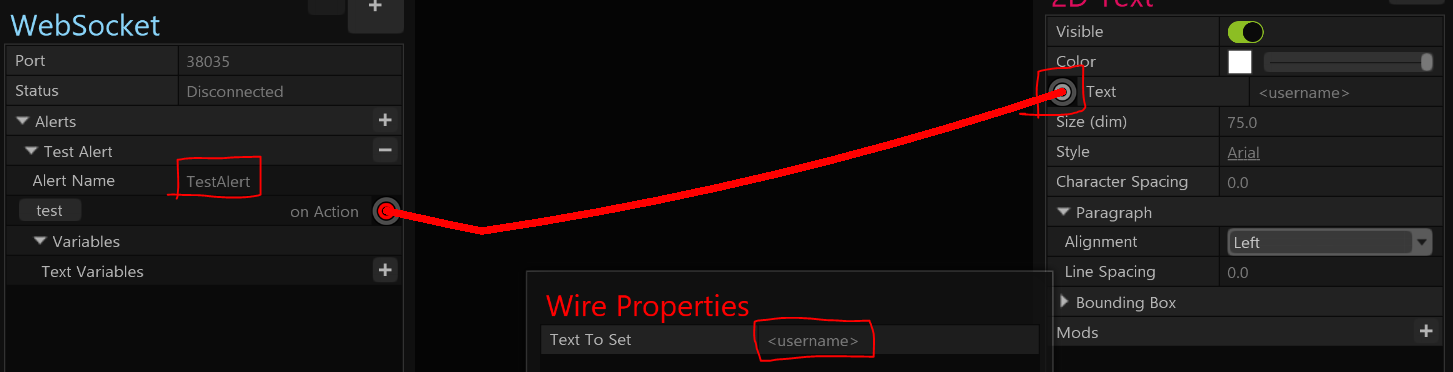
To configure an alert in PolyPop, you’ll use the following steps:
-
Click on the ”+” button on the Alerts expander to add a new alert.
-
Type in the name for the alert.
-
At the “on Action” section below the alert name, click on the button and drag the line over to any property you wish to change on a source.
-
When you connect it to a property, you will get a Wire Properties pop-up to specify what variable name you want to use when setting the text. For the variable name you must put < and > symbols around it. For example, “username” is incorrect and “<username>” is correct.
-
In Mix It Up, add a PolyPop action to your command. Set the Alert Name to the name of the alert, click on Add New Variable, type in the name of the variable without the < and > symbols, and then type in what text you want to set to that variable.
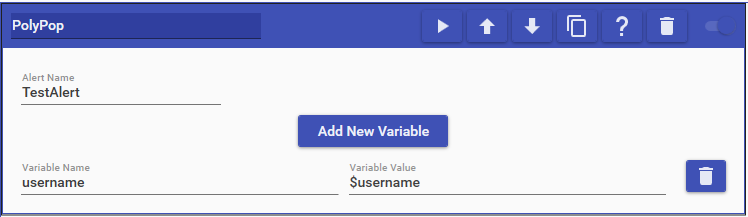
In this full example, we using the name of the user who ran the command ($username) to set as the value to our variable username in PolyPop.