• General
  • Accounts
  • FAQ
  • Getting Started
  • Getting Started
  • Home
  • Tutorials
  • Usage & Requirements
  • Usage Requirements
  • Preview Program
  • Uninstall
  • Platforms
  • YouTube Overlay Widget
  • Twitch
  • Twitch Action
  • Twitch Channel Point Commands
  • Twitch Bits Commands
  • Kick
  • Kick Action
  • Kick Channel Point Commands
  • Kick Kicks Commands
  • Integrations
  • Microsoft Azure Speech
  • Lumia Stream
  • TTS.Monster
  • Pulsoid
  • Tiltify
  • TipeeeStream
  • XSplit
  • Streamlabs
  • Streamlabs
  • Streamlabs Desktop (Streamlabs OBS)
  • Infinite Album
  • Patreon
  • Streamloots
  • Streamloots Card Commands
  • Streamloots
  • mtion studio
  • OvrStream
  • VTube Studio
  • VTS P.O.G.
  • Loupedeck
  • Amazon Polly
  • Discord
  • Rainmaker
  • Responsive Voice
  • Crowd Control
  • Crowd Control Commands
  • Crowd Control
  • OBS Studio
  • JustGiving
  • Stream Deck
  • Twitter
  • Twitch Interactive Throwing System
  • StreamElements
  • TreatStream
  • SAMMI
  • Pixel Chat
  • PolyPop
  • Stream Avatars
  • IFTTT
  • Donor Drive
  • Voicemod
  • Google Cloud TTS
  • Meld Studio
  • Features
  • Moderation
  • Inventory
  • Consumables
  • Overlays
  • Custom Overlay Widget
  • End Credits Overlay Widget
  • Chat Overlay Widget
  • Video Overlay Widget
  • Label Overlay Widget
  • Image Overlay Widget
  • Stream Boss Overlay Widget
  • Overlays & Alerts
  • Overlay Widgets
  • Wheel Overlay Widget
  • Persistent Timer Overlay Widget
  • Leaderboard Overlay Widget
  • Poll Overlay Widget
  • Text Overlay Widget
  • Overlay
  • Event List Overlay Widget
  • Game Queue Overlay Widget
  • Persistent Emote Effect Overlay Widget
  • Goal Overlay Widget
  • HTML Overlay Widget
  • Quotes
  • Stream Pass
  • Giveaways
  • Chat
  • Rank
  • Actions
  • Counter Action
  • Action Groups
  • Input Action
  • Sound Action
  • Special Identifier Action
  • Script Action
  • Streaming Software Action
  • Actions
  • Group Action
  • Web Request Action
  • Text To Speech Action
  • Conditional Action
  • Random Action
  • Repeat Action
  • Wait Action
  • Serial Action
  • Consumable Action
  • File Action
  • External Program Action
  • Game Queue
  • Users
  • Events & Triggers
  • Statistics
  • Redemption Store
  • Commands
  • Command History
  • Command Action
  • Community Commands
  • Timer Commands
  • Game Commands
  • Chat Commands
  • Pre-Made Chat Commands
  • Webhook Commands
  • Commands
  • Event Commands
  • Timers
  • Currency
  • Music Player
  • Reference
  • Special Identifiers
  • Mix It Up Ambassadors
  • Services
  • Developer API
  • Integrations
  • Pre Made Chat Commands

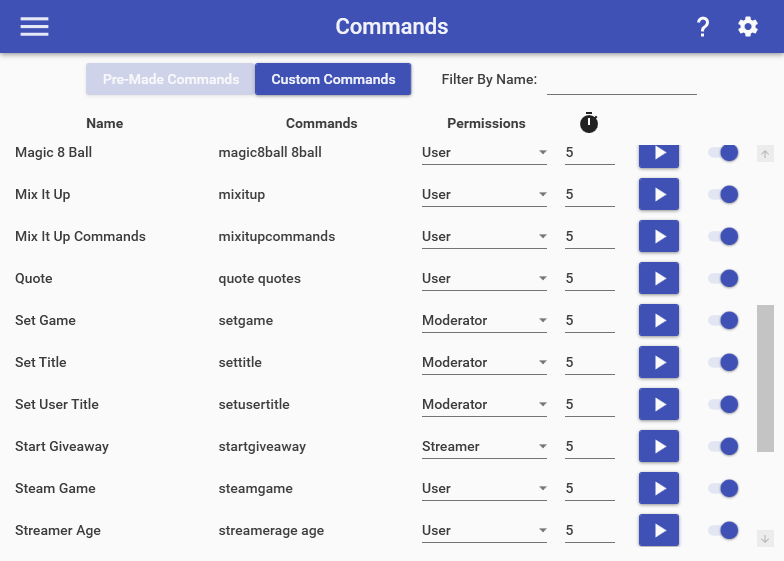
    Mix It Up has several pre-made chat commands that are available for you to use right out of the gate. These commands are set up and ready for you to go, but can also be customized to meet your needs. You have the ability to change who can use them, the timeout on them, and whether to enable/disable them. Below you’ll find the list of all pre-made chat commands:

    Mix It Up Commands

    • !mixitup = Sends a message with a link to the Mix It Up software.
    • !commands = Sends a message with all available chat commands that the user has permission to run.

    Stream Commands

    • !game = Sends a message with the game that is currently being streamed.
    • !title, !stream = Sends a message with the name of the stream.
    • !uptime = Sends a message with current up-time of the stream.
    • !steamgame, !steam = Gets information from Steam about the game currently being played or the name of a game after the command (EX: “!steam Team Fortress 2”)
    • !xboxgame = Gets information from Xbox about the game currently being played or the name of a game after the command (EX: “!xboxgame Halo 5”)

    User Information Commands

    • !followage = Sends a message with user’s age of following this channel.
    • !subage, !subscriberage = Sends a message with the user’s age of subscribing to this channel
    • !streamerage, !age = Sends a message with streamer’s account age.

    Quote Commands

    • !quote = Sends a message with a randomly selected quote.
    • !quote [NUMBER] = Sends a message with the quote that has the specified number.
    • !quote [TEXT] = Sends a message with the quote that contains the specified text.
    • !lastquote = Sends a message with the most recently added quote.
    • !addquote, !quoteadd = Adds a new quote with the text after the command itself. (EX: !addquote I’m a new quote!)
    • !deletequote, !quotedelete = Deletes quote that has the specified number. (EX: !deletequote 17)

    Moderator Commands

    • !setgame = Sets the name of the game for the stream. (EX: “!setgame Team Fortress 2”)
    • !settitle = Sets the title for the stream. (EX: “!settitle Playing Games!”)
    • !startgiveaway = Starts a giveaway with the specified item using the current settings on the Giveaway page. (EX: “!startgiveaway 1000 V-Bucks”)
    • !addcommand = Adds a new command with a single Chat action. (EX: !addcommand [COMMAND TRIGGER, NO !] [COOLDOWN] [FULL COMMAND MESSAGE TEXT])
    • !updatecommand = Edits an existing Chat command by removing all actions & adding a single Chat action with the specified text. (EX: !updatecommand [COMMAND TRIGGER, NO !] [COOLDOWN] [OPTIONAL FULL COMMAND MESSAGE TEXT])
    • !disablecommand = Disables a Chat command. (EX: !disablecommand [COMMAND TRIGGER, NO !])
    • !setusertitle = Sets a custom title for a user. (EX: “!setusertitle @saviorxtanren The Coolest Person!”)

    User Account Linking

    • !linkaccount = Starts an account linking process for the user that ran the command to link their data together across two different streaming platforms. (EX: !linkaccount trovo saviorxtanren)

    Fun Commands

    • !magic8ball, !8ball = Asks the magic 8-ball a question and get back a response!

    Choose which cookies to allow. Your preference is saved for 6 months.

    Necessary
    Required for the site to function correctly. Cannot be disabled.
    Analytics
    Helps us understand how visitors use the site. No personal data is shared with third parties.