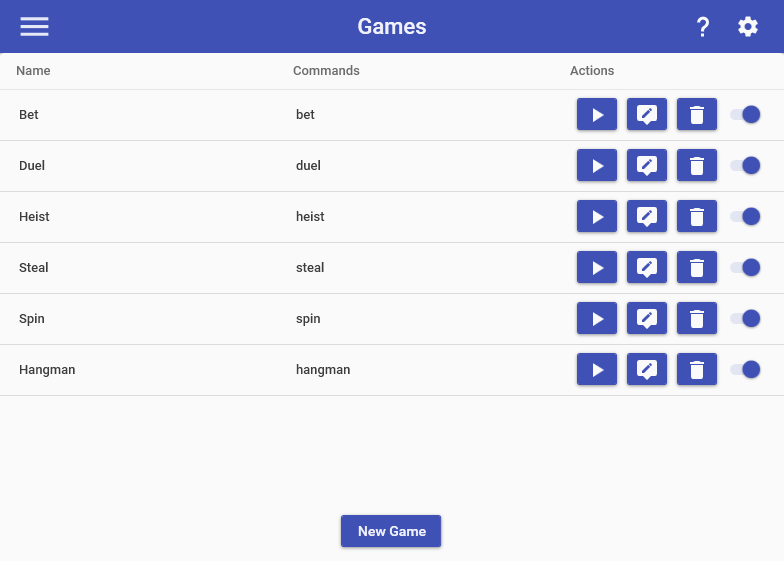
The Games feature allows you to create & tweak your own games for your channel. Mix It Up comes with tons of different game types that you can add to your game. With each game, you can use the “stock” version of it that we build for you when you first create it or you can completely re-vamp it to your hearts content. You can also create multiple different versions of the same game type. For example, you could create 10 different versions of the Spin game, each with their own command triggers, probabilities, and payouts.
Currency Requirement
When creating a game for the first time, it will automatically add a currency requirement using the default currency if you have one. You can optionally remove any currency requirements for some games, but not all games as some functionally don’t make sense with a currency requirement.
Special Identifiers
All games have various sub-commands that are part of them; these are how the game will interact with your viewers, such as saying things in chat. When using these sub-commands, you can use the regular Special Identifiers in them, plus the following additional ones:
Common Game Type Special Identifiers
- $gamebet - The amount of currency that the user has bet in the game (EX: 100)
- $gamepayout - The amount of currency that the user received as a payout (EX: 200)
- $gameallpayout - The total amount of currency that all users who played the game received as a payout (EX: 1000)
- $gamewinners - The list of users who have won the game. For single-player games, this will only be one user and you should just use $username. For other games, this could be 1 or more users. (EX: @SaviorXTanren, @VerbatimT, @TyrenDes)
- $gamewinnerscount - The total number of users who have won the game.
Game Templates
When making a new game, you must select a game template to start with, then you can edit all aspects of how the game works. Below you’ll find all of the game templates that we currently have:
Bet
The Bet game allows a user to start a bet amongst all users over which option is correct. Each user who participates must specify which options you expect to win and how much they wish to bet. Once the time limit is completed, a user can specify what the correct answer is to the bet and all correct users will be rewarded. Additionally, you can specify what user roles can start & answer this game to ensure it isn’t abused, such as Moderators or higher only.
EX: !bet
EX: !bet <OPTION #> 100
EX: !bet answer <OPTION #>
- $gamebetoption - The name of the option that the user selected when they bet (EX: “Wins the match!”)
- $gamebetoptions - The list of all the options that are selectable by users with their numbers) (EX: 1) Win, 2) Lose, 3) Draw )
- $gamebetwinningoption - The name of the option that was declared the winner of the bet (EX: “Wins the match!”)
Bid
The Bid game allows a user to start a bidding competition amongst all users to win a prize or special privilege. A user must bid at least 1 currency amount higher than the highest bid to become the leading bidder. When a user is outbid, they receive their bet currency back and the highest bidder when time runs out wins. Additionally, you can specify what user roles can start this game to ensure it isn’t abused, such as Moderators or higher only.
EX: !bid 100
Coin Pusher
The Coin Pusher game allows a user to deposit a specific amount of currency into a machine with the chance for a large payout. A minimum amount of currency must be inserted into the machine to allow for a payout and a minimum & maximum payout percentage can be specified when a payout occurs.
EX: !pusher 100
- $gametotalamount - The total amount of currency that has been deposited into this game. (EX: 12500)
Duel
The Duel game challenges the specified user to a winner-takes-all for the bet amount. If successful, the user takes the bet amount from the specified user. If failed, the specified user takes the bet amount from the user.
EX: !duel < USERNAME> 100
Hangman
The Hangman game allows users to guess the letter combination of a random word to win an accumulated pot of currency. Every failed guess puts the required currency amount into the pot and adds a failure, while a correct guess adds the letter. The person to guess the last missing letter gets the whole pot.
Users have the ability to see the status of the game to see how much the pot is and what has been guessed already.
EX: !hangman < LETTER >
Heist
The Heist game allows a user to start a group activity for users to individually bet when they participate. Each user has their own individual chance to succeed and win back more or fail and lose their bet.
EX: !heist 100
Hitman
The Hitman game allows a user to start a winner-takes-all bet amongst all entered users. After the initial time limit, a hitman with a specific name will appear in chat. If a user types the hitman’s name in chat within the time limit, they win the entire pot. Otherwise, everyone loses their money.
EX: !hitman 100
- $gamehitmanname - The name of the hitman selected for the game. (EX: ACCORDING)
Hot Potato
The Hot Potato game gives a ticking potato bomb to a player, who must then pass it off to someone else before it explodes. The user who passed the potato bomb last is dubbed the winner ($username) and the user who had the potato bomb when it exploded is dubbed the loser ($targetusername).
EX: !potato
EX: !potato < TARGET USER >
Lock Box
The Lock Box game allows you to guess the combination of a locked box using the numbers 0 - 9 that contains a large amount of currency. Every failed guess puts the required currency amount into the box and gives a hint to the combination, while a correct guess gets all the currency inside.
Users have the ability to see the status of the lock box to see how much is in it and inspect the lock box for a hint as to the combination.
EX: !lockbox 100
- $gametotalamount - The total amount of currency that has been deposited into this game. (EX: 12500)
Roulette
The Roulette game allows a user to start a group betting game amongst all users to bet on a specific number or name. If the game is based on a number range, then a user can select any number in that range. If the game is based on a series of names, a user can select any one of the names. All users who select the winning bet type get the payout for their bet, everyone else losses their bet.
EX: !roulette < NUMBER > 100
- $gamebettype - The bet type that the user selected for the game. (EX: 5)
- $gamevalidbettypes - A list of all the type of valid bets for the game. (EX: 1-30)
- $gamewinningbettype - The bet type that was selected as the winner for the game. (EX: 19)
Russian Roulette
The Russian Roulette game allows a user to start a winner-takes-all bet amongst all entered users. By default, the user that starts the game specifies how much the bet is and all subsequent users must bet that amount to join, with all winners of the game splitting the total payout equally.
EX: !rr 100
After Start: !rr
Slot Machine
The Slot Machine game picks a random set of 3 symbols from a pre-defined list and selects any outcome that matches those symbols. Besides selecting a payout for each outcome, you can also run a customized command for each outcome.
EX: !slots 100
Spin
The Spin game picks a random number and selects an outcome based on that number. Besides selecting a payout for each outcome, you can also run a customized command for each outcome.
EX: !spin 100
Steal
The Steal game attempts to steal currency from another user in chat. If successful, the user steals the bet amount from the user. If failed, they lose the bet amount.
EX: !steal 100
Treasure Defense
The Treasure Defense game is a team-based betting game. A user starts the game with a bet amount, and other users join by betting the same amount within the time limit.
After the time limit is up, one participant is selected to be the King. All other participants are secretly assigned as either Knights or Thieves. The King must pick one participant, hoping it is a Knight to help defend the treasure. If the King picks a Knight, the King and all Knights share the winnings. If the King picks a Thief, all Thieves share the winnings instead.
EX: !treasure < AMOUNT >
EX: !treasure
EX: !treasure < SELECTED USER >
Trivia
The Trivia game picks a random question from either a pre-determined online list or custom questions you provide and asks all users to select the correct answer from a list of possible ones. All users that selected the correct answer are awarded a payout.
EX: !trivia
When the game has started, users need to simply type the corresponding number via the answer they think is correct. For example, if they want to select answer #3, they would simply type “3”.
- $gamequestion - The current question being asked
- $gameanswers - The list of answers with their corresponding numbers (EX: 1) Joe, 2) Smoe, 3) Ann )
- $gameanswerX - The specific answer for the Xth number. For example, $gameanswer1 will give you the 1st selectable answer (EX: Joe)
- $gamecorrectanswer - The number of the correct answer (EX: 1 )
Volcano
The Volcano game allows a user to deposit a specific amount of currency into a volcano with the chance for a personal payout and a payout for all users in chat. The volcano goes through 3 stages as more and more currency is deposited into it and a different set of Deposit & Status commands are used depending on what stage the Volcano is at
Once the volcano reaches stage 3, each subsequent deposit has a chance to trigger an eruption. When an eruption occurs, the user who triggered it gets a specialized payout for them. After the eruption, all users have a chance to collect erupted currency during the collection time limit. After the collection is done, the volcano contents resets back to 0.
EX: !volcano 100
- $gametotalamount - The total amount of currency that has been deposited into this game. (EX: 12500)
Word Scramble
The Word Scramble game posts a scrambled word in chat that users race to unscramble. A user starts the game with a bet, and other users add to the pot by joining. After the initial time limit, the scrambled word is revealed. The first user to type the unscrambled word in chat within the time limit wins the entire pot. If no one solves it in time, everyone loses their bet.
EX: !scramble 100