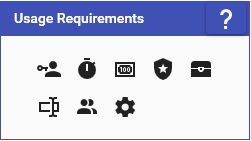
Usage Requirements allow you to specify limitations on who and when a command can be used. Each icon corresponds to a different Usage Requirement below:
User Role
The User Role requirement allows you to specify the minimum user role that is required in order to run this command. All user roles that are “higher” than the one you specify can use this command as well. (EX: If set to Follower, then Subscribers, Mods, & Streamers can use this command)
Cooldown
The Cooldown requirement allows you to specify how often a command can be used. Cooldown amounts are in seconds and can be set up in the following ways:
Individual
The command cools down by itself for EVERYONE for the specified amount
Group
The command cools down itself and all others in the same group for EVERYONE for the specified amount
Per Person
The command cools down for ONLY the user that ran it, meaning each user has their own unique cooldown for it.
Currency/Rank/Inventory
The Currency/Rank/Inventory requirement allows you to prevent a command from being run if a user does not meet a currency, rank, or inventory requirement. See below for a description of how each individual requirement works. For more information about Currencies, Ranks, or Inventories, please see the Currency/Rank/Inventory Wiki page.
Currency
The Currency requirement allows you to specify a minimum amount of Currency that the user is required to have in order to use this command. If the user has the correct amount, it will be deducted from them when they run the command. Below are the different options you can select:
- Required Amount - The currency amount that is specified is required and is the only amount accepted. Also, this means no currency amount will need to be specified when running the command.
- Minimum Only - The currency amount specified by the user must be at least the minimum amount, but can be any number higher than it. It will specifically check the first argument of the command for an amount, then attempt to check the second argument, and fall back to using the minimum amount specified.
- Minimum & Maximum - The currency amount specified by the user must be between the minimum & maximum amount, including those values. It will specifically check the first argument of the command for an amount, then attempt to check the second argument, and fall back to using the minimum amount specified.
Rank
The Rank requirement allows you to specify a Rank that the user is required to be in order to use this command. You can additional specify how that rank is checked, for example whether the user can be that rank or higher or only that rank.
Inventory
The Inventory requirement allows you to specify an amount of items for an Inventory that the user is required to have in order to use this command. If the user has the correct amount, it will be deducted from them when they run the command.
Arguments
The Arguments requirement allows you to specify a required set of arguments that need to be provided when the command is run. You can set what the name of the arguments are, what type they are, and whether they are optional or not. You also can optionally toggle the “Assign To Special Identifiers” option to have the corresponding argument text assigned to a Special Identifier matching the name of your argument (EX: Argument named “Cool Name” becomes the Special Identifier “$coolname”)
Threshold
The Threshold requirement allows you to specify how many times the command must be performed before it will actually trigger. You must specify the number of UNIQUE users who need to run the command and the time frame that it must be done in. For example, if I had a chat command and specified 3 for the users and 30 seconds for the time frame, the command would not run until 3 different users run the command within 30 seconds of each other.
By default, when the requirement is met, it will only run the command once for the last user who triggered the command. You can use the “Run For Each User” if you would like to have it run the command for each user that contributed to the Threshold requirement in the order they helped.
Settings
The Settings requirement has several different options you can enable that affect either the ability to run the command or how it is run. This options currently include:
- The ability to delete chat commands when they are run
- Setting the required Patreon benefit needed to run this command
- The ability to assign to command to the Chat context menu (Chat Commands Only)
Error Messages
When a requirement fails validation, an error message will be sent informing the user as to why the requirement failed. Subsequent requirement failures can send more error message depending on what you have set as the Requirement Errors Cooldown Amount under Settings -> Command. This setting does the following:
- When each requirement is validated, if an error message would be sent it will sent the message and then set a cooldown time based on the amount of seconds you have set
- If the same requirement for the same command triggers another error message, it checks to see if it the cooldown time has finished
- If the cooldown time hasn’t been finished, then it doesn’t send the error message. If it has, then it sends it and resets the cooldown
- When all requirements are validated and the command is started, it resets all of the error message cooldowns on each requirement
So if you have it set to let’s say 30 seconds, then each individual requirement for a command can only send an error message once every 30 seconds. So an error message sent from a Role Requirement doesn’t effect an error message from a Currency Requirement, as two different blocking issues. It’s also on a per-command basis, so a Cooldown Requirement on a shoutout command won’t effect a raid command. Effectively speaking if you set the number very high (EX: 999999), then it only ever send 1 error message per requirement, per command, per run.