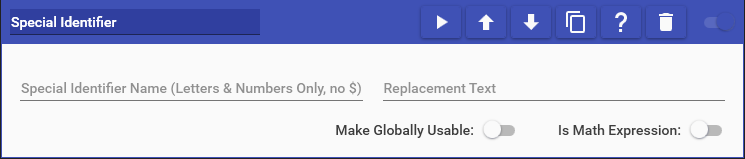
Special Identifier actions allow you to create custom Special Identifiers with any set of supplied text, even using other Special Identifiers. You can also perform special functions on the replacement text to alter it before it’s saved:
- tolower(TEXT) = Converts all letters to their lower-case form
- toupper(TEXT) = Converts all letters to their upper-case form
- removespaces(TEXT) = Removes all spaces from the text
- removecommas(TEXT) = Removes all commas from the text
- length(TEXT) = Replaces with the total number of characters in the text
- count(TEXT,SEARCH) = Counts the number of times SEARCH is present in TEXT (EX: count(Count the number of e letters in this sentence,e) => 7)
- replace(TEXT,SEARCH,REPLACEMENT) = Replaces SEARCH with REPLACEMENT everywhere it’s present in TEXT (EX: replace(Hello World,World,Universe) => Hello Universe)
- urlencode(TEXT) = URL encodes the text for use as part of URL paths (EX: “Hello World” => “Hello+World”)
- uriescape(TEXT) = URI escapes the text for use as part of URL paths (EX: “Hello World” => “Hello%20World”)
- datefrom(date): Calculates the time elapsed since a past date. Returns an error if the date hasn’t occurred yet. (EX:
datefrom(2025-01-01)) - dateto(date): Calculates the time remaining until a future date. Returns an error if the date has already passed. (EX:
dateto(2026-12-25))
Note: Both dateto() and datefrom() functions support including a time alongside the date (EX: 2026-12-25 14:30:00 or 2026-12-25 2:30 PM). Accepted date formats may vary based on your PC’s regional/culture settings (EX: MM/DD/YYYY for US, DD/MM/YYYY for UK).
By default, custom Special Identifier will only work within the command they were created in and will cease to exist after the command is finished. If you wish to access a Special Identifier after a command is finished, you can enable the Make Globally Usable option. This will persist the Special Identifier for as long as Mix It Up is running. When using this option, it is VERY IMPORTANT to be careful what you name this custom Special Identifier, as you can prevent other Special Identifiers from working. For example, if you make a custom Special Identifier called $user, this would prevent all User Special Identifiers from working correctly such as $username.
You can also use this action to run math computations & store the result in a Special Identifier by toggling the Is Math Expression option. Simply type in an equation, which can contain other Special Identifiers, and include the appropriate math symbols (EX: +, -, *, /). You can also use special functions in here to perform operations, such as finding the minimum of two numbers. The full list of support functions can be found here: https://github.com/pieterderycke/Jace/wiki