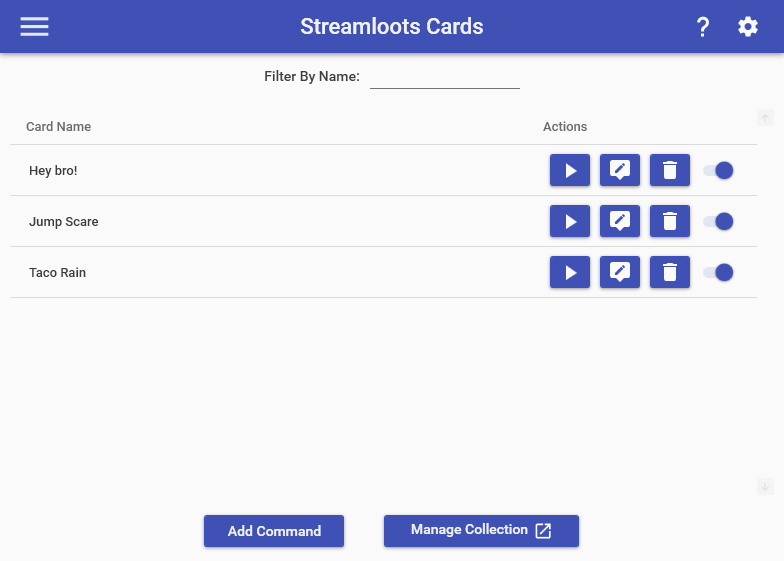
The Streamloots Cards feature allows you to create commands that can be triggered automatically when specific Streamloots Cards are redeemed in your channel. To setup a command to trigger for a specific card, all you must do is select the option to add a new command and name it EXACTLY the same as your Streamloots Card. In order to see this page, you must have the Streamloots Service already connected on the Services page.
When testing cards for use with commands, you must use the Test button in the card editor window specifically to have it properly trigger the response in Mix It Up:

Streamloots Card commands provide the following additional Special Identifiers:
- $streamlootscardname = The name of the card that was redeemed. (EX: “Let’s play together!”)
- $streamlootscardimage = The image URL of the card that was redeemed. (EX: https://res.cloudinary.com/streamloots/image/upload/f_auto,c_scale,w_250,q_90/static/e19c7bf6-ca3e-49a8-807e-b2e9a1a47524/en_dl_character.png )
- $streamlootscardrarity = The rarity name of the card that was redeemed (EX: “legendary”)
- $streamlootscardvideo = The video URL of the card that was redeemed. (EX: https://cdn.streamloots.com/uploads/5c645b78666f31002f2979d1/3a6bf1dc-7d61-4f93-be0a-f5dc1d0d33b6.webm )
- $streamlootscardhasvideo = Whether the redeemed card has a video associated with it. (EX: true )
- $streamlootscardsound = The sound URL of the card that was redeemed. (EX: https://static.streamloots.com/b355d1ef-d931-4c16-a48f-8bed0076401b/alerts/default.mp3 )
- $streamlootscarddescription = The description of the card that was redeemed.
- $streamlootscardalertmessage = The alert message associated with the card that was redeemed.
- $streamlootsmessage = The message the user supplied when they redeemed the card. Only corresponds to the field “message” or “longMessage” on your card redemption. (EX: “Hey there, favorite buddy!”)
