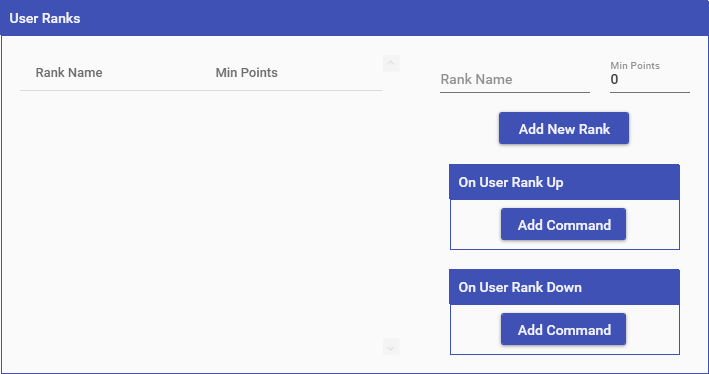
Ranks are intended for your users to compare themselves to others by how long they have been in your stream. Ranks function very similarly to Currencies with 1 minor difference; you can define individual rank levels which users can reach as they acquired more points. A rank level is simply a name and the amount of points that a user needs in order to reach that rank level.
Both currencies & ranks run off of a points system in Mix It Up, however each currency & rank maintain their own, unique points system that is not affected by any other ones. Additionally, when you create a new currency or rank, each user starts off with 0 points for that currency/rank. The amount of time that they have been in your channel up to that point DOES NOT get counted and added to the user. However, after have created your currency/rank, you can re-edit it and select the “Retroactively Give Points” button at the bottom. This will give each user an amount of points equal to the time they have been in your channel, including any Subscriber or Moderator bonuses.
A singular currency/rank can be marked as Primary when editing this. This currency/rank will be shown on the Users page next to each user in the list and can be used as a value to sort by. Additionally, the currency/rank will be used by default for all Game commands created.
NOTE: The maximum number for any currency, rank, inventory, or stream pass value is 2,147,483,647.
Special Identifiers
Rank Special Identifiers are ways to reference a user’s rank points. The actual Special Identifiers for your Rank will be different for every single one, as they vary based off of the name. However they do fit into a per-determined format. These can also be used with other Special Identifiers that work for users such as Target, Argument, Streamer, & Random (EX: $targetuser____)
For example, if I have a Rank named “Power”, then all of the ____‘s below would be replaced with “power”. If the name of your Rank has spaces in it, then those spaces will NOT be in it (EX: “Super Power” -> “superpower”).
- $user____ = The amount of rank points for the user who ran the command. (EX: 200)
- $user____display = The amount of rank points for the user who ran the command in a display-friendly format. (EX: 20,000)
- $user____rank = The current rank name for the user who ran the command. (EX: Leader)
- $user____next = The amount of rank points required for the next rank for the user who ran the command. (EX: 200)
- $user____nextrank = The next rank name for the user who ran the command. (EX: Leader)
- $user____position = The position of the user compared to all other users. (EX: 18)
Top
- $top10____ = A list of the top 10 rank users (EX: #1) @CountessSaiku - 3786, #2) @VerbatimT - 2789, …)
- $topX____ = A list of the top X rank users, where X is any number greater than 0 (EX: #1) @CountessSaiku - 3786, #2) @VerbatimT - 2789, …)
- $top____user____ = Gets the top ranked user’s data. All User special identifiers can be used this way (EX: $top____username will get you their username). Please see the User Special Identifiers for all that you can use with this.
All
- $____alltotal = The total amount of rank points across all users (EX: 20000)
- $____alltotaldisplay = The total amount of rank points across all users in a display-friendly format (EX: 20,000)
- $____rankcount = Total number of users who have the specific rank